
Parking records built from vehicle entry, tariff and exit workflows.
Automate parking entry, active vehicle tracking, pass-holder recognition, tariff calculation, receipts and exit approval using cameras, ANPR, gate workflows and barrier integrations.
Entry
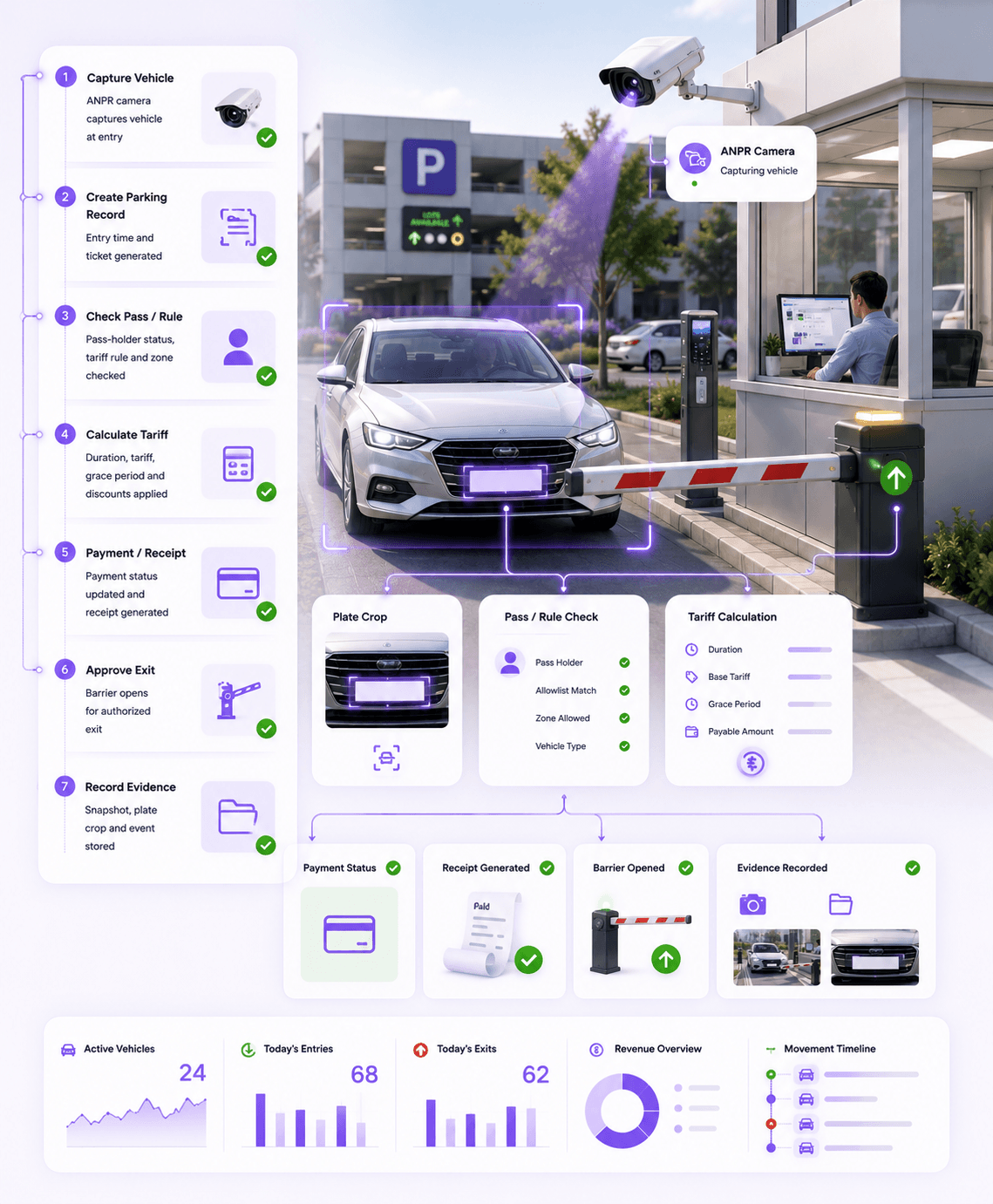
Vehicle is captured at the entry gate with plate, camera and ticket context.
Classify
System checks pass holder, visitor, vehicle type, zone and parking rules.
Calculate
Tariff, grace period, duration, discounts and payable amount are calculated.
Exit
Receipt, payment status and barrier approval are recorded at exit.
Capture entry
Vehicle entry is recorded using ANPR, camera evidence or gate workflow.
Apply parking rule
Pass, visitor, tariff, grace period and zone rules are applied automatically.
Automate exit
Exit approval, receipt, payment status and barrier action are connected.
Workflow outcome
Every parking event is linked to vehicle, ticket, time, tariff, payment status, exit approval and evidence.
Parking automation gap
Opening a barrier is easy. Managing the complete parking transaction is harder.
Omnivue connects vehicle entry, pass rules, tariff calculation, payment status, receipt printing, exit approval and evidence into one parking workflow.
Manual parking tickets
Reduce handwritten tickets, manual entry logs and delays at parking gates.
Unclear active vehicle status
Know which vehicles are currently parked, when they entered and whether they have a pass.
Tariff calculation errors
Calculate charges based on time, vehicle type, pass status, grace period and configured tariff rules.
Slow exit processing
Reduce exit delays by connecting vehicle lookup, payment status, receipt and barrier action.
Pass-holder confusion
Separate residents, staff, monthly pass holders, visitors and paid parking vehicles clearly.
Weak audit trail
Preserve vehicle, plate, gate, ticket, payment, receipt and operator evidence for review.
Parking workflows
Different parking environments need different operating rules.
Hotels, residential communities, commercial buildings, parking operators and facility gates do not run parking in the same way. Omnivue configures parking automation around the actual site workflow.
Entry Ticket Workflow
Capture vehicle entry, generate ticket record and optionally print thermal receipt.
Paid Visitor Parking
Calculate parking fee at exit using duration, vehicle type, tariff and grace rules.
Pass Holder Parking
Allow daily, weekly, monthly, resident or staff pass holders based on validity rules.
Hotel & Commercial Parking
Support reception, security desk or operator-assisted parking workflows.
Barrier-Controlled Exit
Connect exit approval with payment status, receipt and boom barrier action.
No-Parking / Zone Monitoring
Monitor restricted zones, dwell time and obstruction areas where required.
Connected workflow
From entry capture to paid exit record.
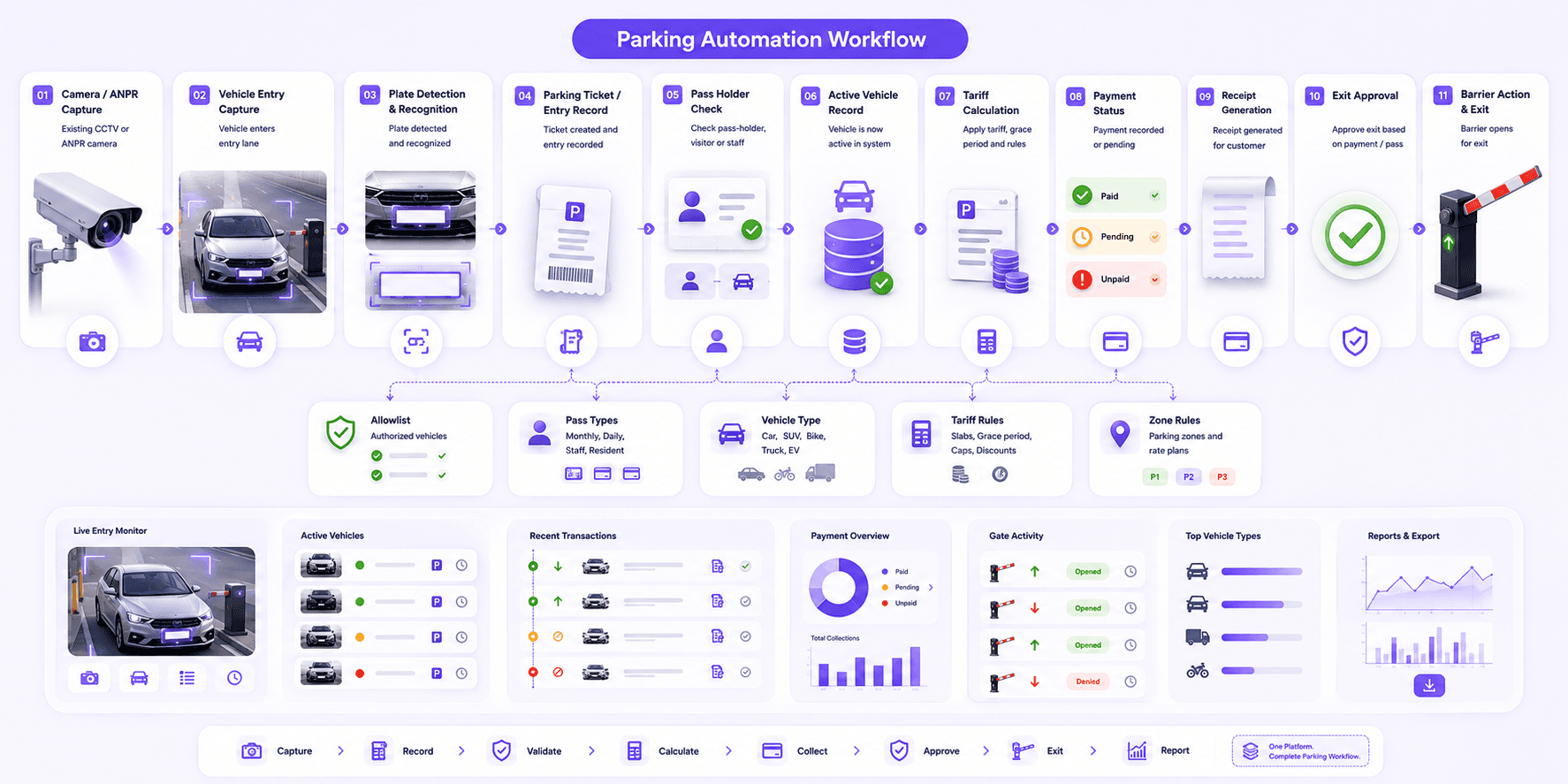
Omnivue turns parking camera feeds and gate events into active vehicle records, tariffs, receipts, payment status and exit approvals.
Vehicle entry is captured at the parking gate.
Pass, visitor or paid parking rules are applied.
Tariff, grace period and payment status are calculated.
Receipt, exit approval and barrier event are recorded.
Deployment & configuration
Configure parking automation around your gates, tariffs and passes.
Omnivue can support simple entry-exit parking as well as more advanced pass-holder, visitor, hotel, commercial and offline-first parking deployments.
Entry and exit parking gates
ANPR-based vehicle lookup
Thermal ticket / receipt printing
Pass-holder recognition
Tariff and grace period rules
Cash / card / manual payment status
Boom barrier integration
Offline / on-premise deployment
Powered by Omnivue ParkGuard
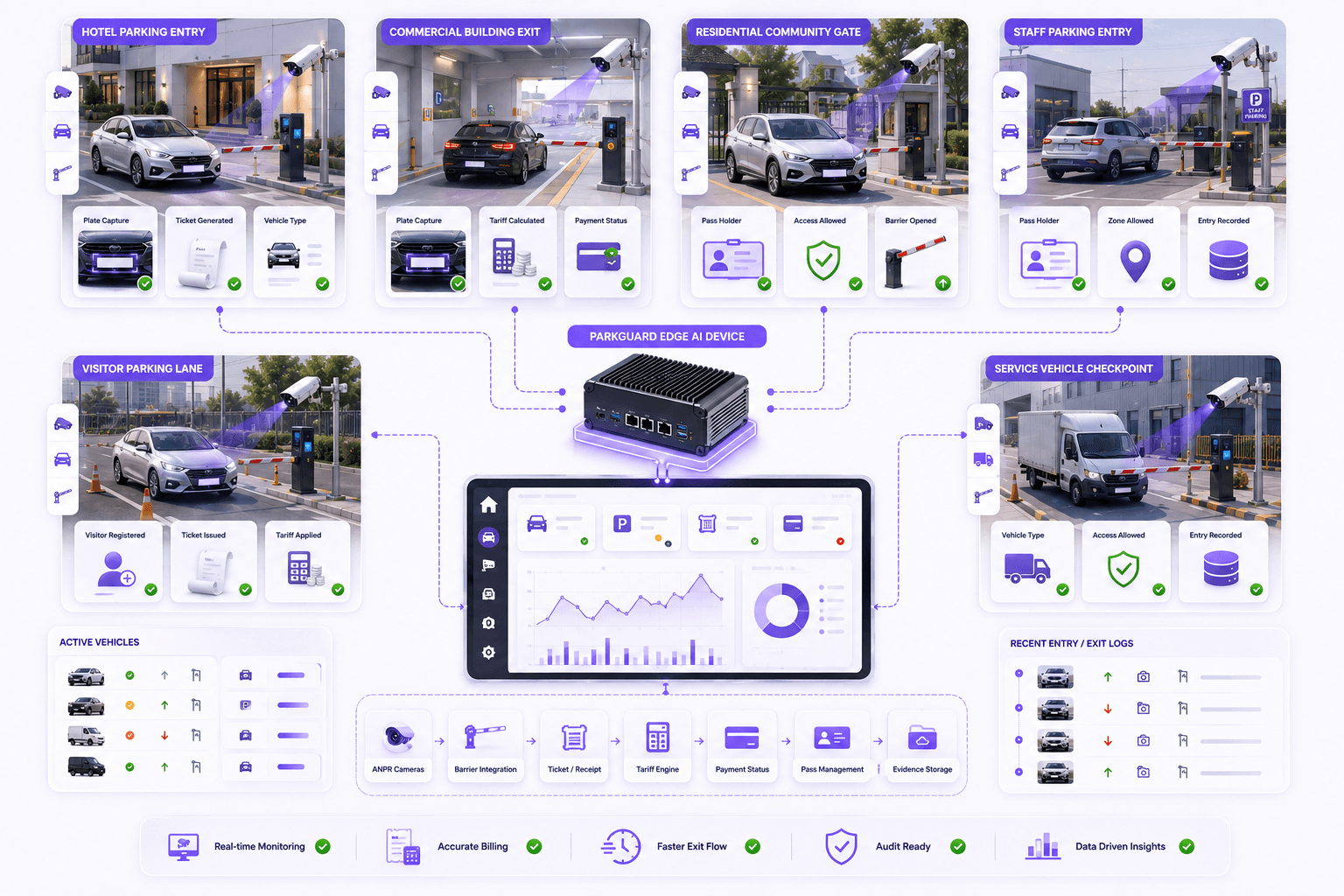
ParkGuard powers the parking record, tariff and exit workflow layer.
Omnivue ParkGuard provides active vehicle records, parking event history, tariff logic, pass-holder support, receipt workflow and barrier integration readiness behind this Parking Automation solution.
Active vehicle records
Entry and exit movement history
Parking tariff calculation
Pass-holder and exemption support
Receipt and payment workflow readiness
Barrier integration and audit evidence
Better parking operations
Move from parking gate handling to parking automation.
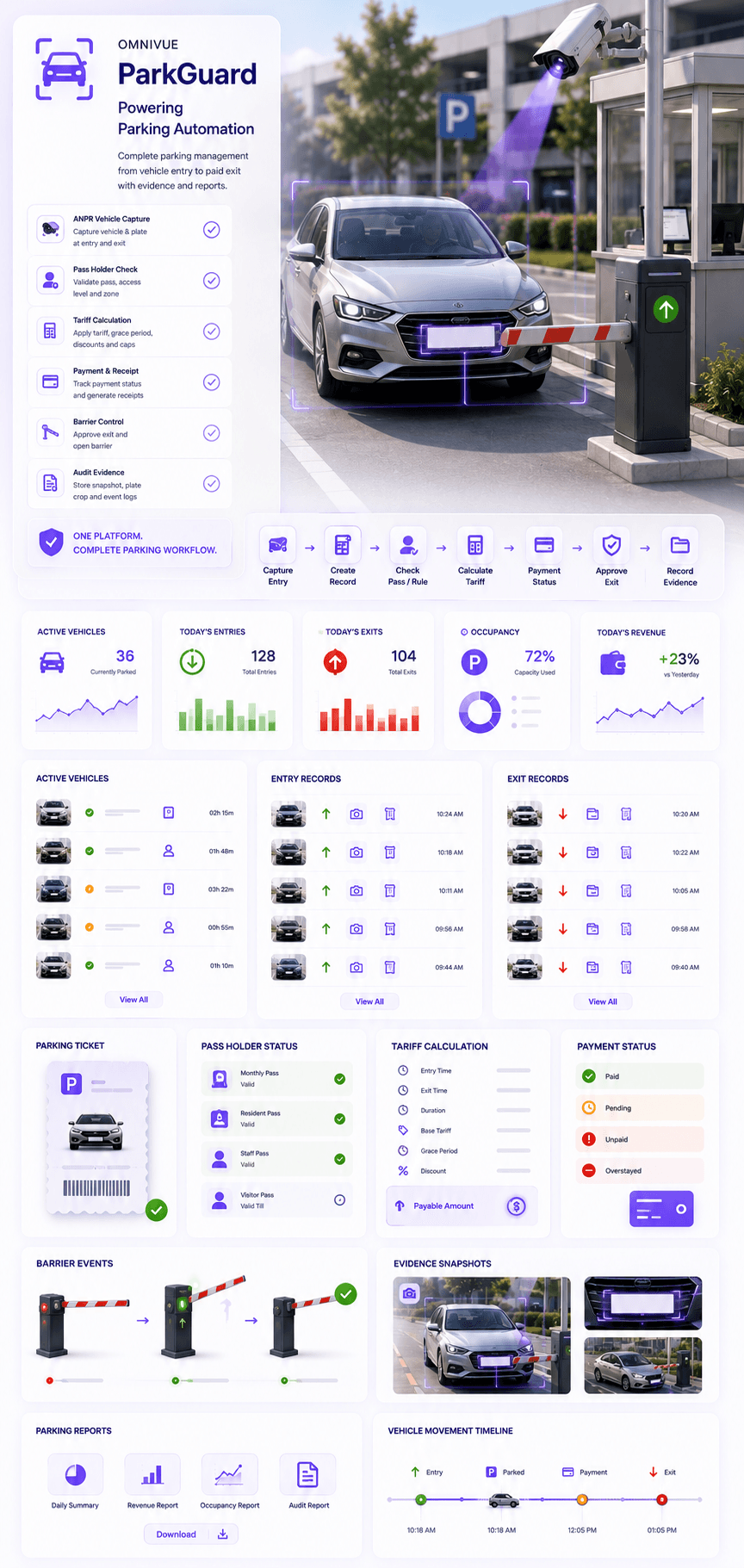
Convert vehicle entry and exit points into accountable parking workflows with tickets, tariffs, receipts and evidence.
Traditional
Guard manually writes vehicle entry details
Omnivue
Vehicle entry, plate, ticket, camera, time and gate context are captured automatically.
Traditional
Exit fee is calculated manually
Omnivue
Tariff, duration, grace period, pass status and payable amount are calculated by rule.
Traditional
Pass holders and visitors are difficult to separate
Omnivue
Pass, visitor, staff, resident and paid parking workflows are handled separately.
Traditional
Payment and barrier opening are disconnected
Omnivue
Payment status, receipt, exit approval and barrier action are connected in one record.
Where it fits
Designed for sites where parking needs to be captured, billed and recorded.
Hotels & Commercial Buildings
Visitor parking, paid parking, receipts, exit approvals and operator workflows.
Residential Communities
Resident, guest, staff and service-vehicle parking with pass-holder logic.
Parking Operators
Entry-exit records, tariff management, active vehicles and daily reports.
Warehouses & Facilities
Vehicle entry, yard parking, service vehicle movement and restricted-zone visibility.
Outcomes
What improves after deployment?
Reduce manual parking gate workload
Create searchable active vehicle and parking history
Improve tariff, pass and visitor vehicle handling
Connect receipt, payment and exit approval workflows
Improve audit readiness with evidence-backed records
Support offline and on-premise parking deployments
Best fit
Sites with controlled parking entry-exit lanes, pass-holder needs, visitor parking, tariff calculation or barrier-based parking operations.
Fit & readiness
What makes parking automation work well?
Parking automation works best when entry lanes, exit lanes, tariff rules, pass-holder rules and device integrations are planned before deployment.
Clear entry and exit lanes
Defined vehicle lanes make it easier to capture entry, exit, plate and barrier events reliably.
Usable plate visibility
ANPR works best when plate angle, lighting and camera position are suitable.
Mapped tariff rules
Vehicle types, grace period, slabs, caps, pass rules and exemptions should be configured before rollout.
Barrier and printer planning
Boom barrier, receipt printer, payment and operator workflows should be reviewed during setup.
Share your parking workflow. We’ll suggest the right setup.
Tell us your entry and exit gates, parking tariff rules, pass-holder categories, receipt requirements and barrier setup. Omnivue can help design the right parking automation workflow.