
Facility events built from cameras, alerts and operational workflows.
Use existing CCTV or IP cameras to monitor lobbies, elevators, access points, reception desks, guard posts and facility zones with alerts, evidence and reports.
Observe
Existing cameras monitor lobbies, gates, elevators, reception desks and facility zones.
Detect
Edge AI identifies operational exceptions, access events, unattended zones and safety signals.
Alert
Relevant teams receive alerts with camera, location, event type and priority context.
Review
Events are stored for reporting, audits, investigation and operational improvement.
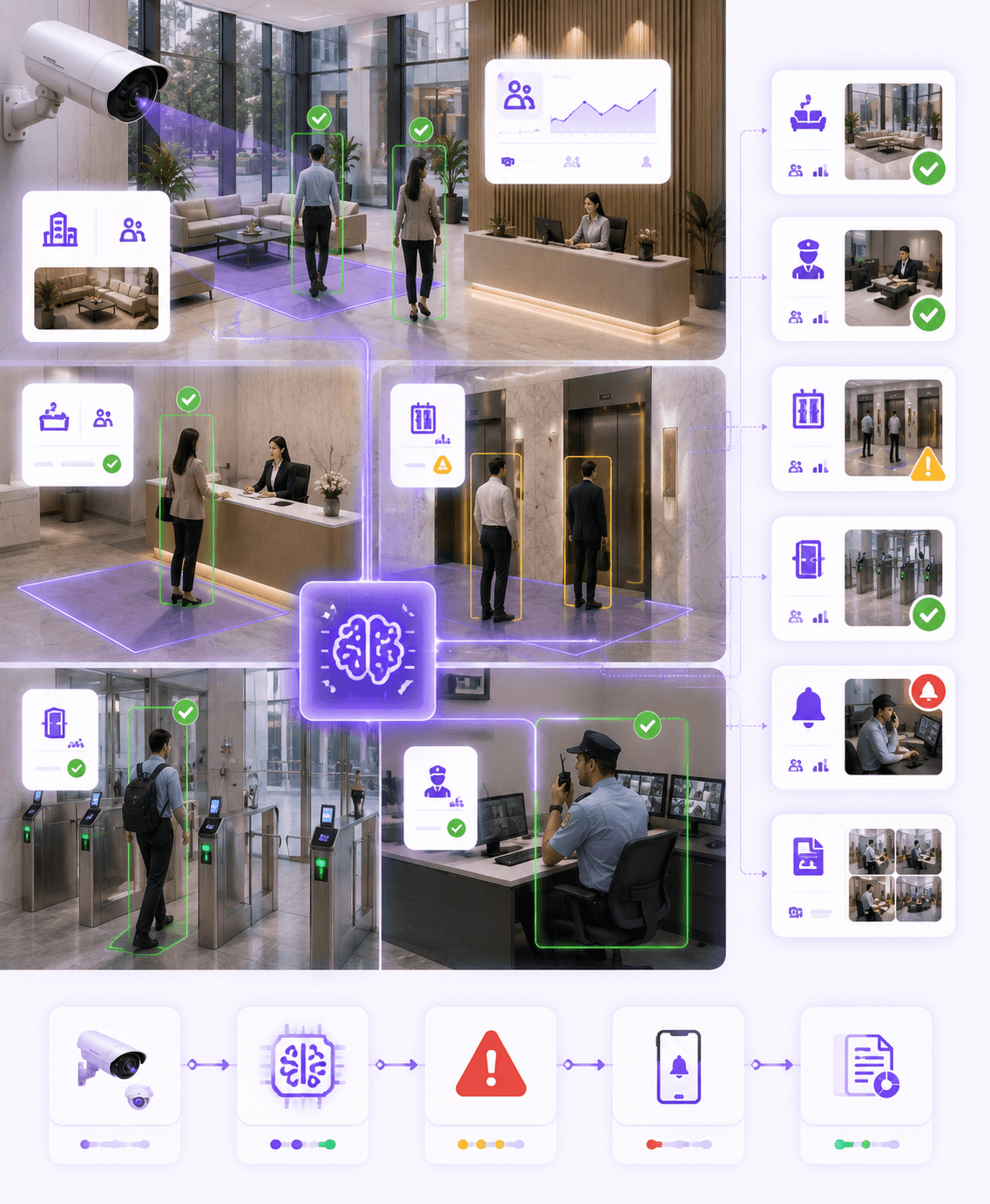
Monitor operations
Track lobbies, gates, elevators, reception areas and facility zones.
Detect exceptions
Identify missed guard presence, elevator risks, access issues and crowd events.
Record evidence
Maintain visual proof, timestamps, camera context and review history.
Workflow outcome
Every facility event is linked to camera, zone, time, rule, alert status and evidence snapshot.
Facility operations gap
Watching a building is easy. Running it with real-time intelligence is harder.
Omnivue connects camera views, operational rules, alerts, evidence and review workflows into one layer for facility, security and operations teams.
Disconnected facility monitoring
Security, reception, elevator, access and visitor workflows often operate in separate systems.
Delayed incident awareness
Facility teams may find out about exceptions only after complaints or manual review.
No guard presence visibility
Monitor whether critical desks, gates or security posts are staffed when required.
Elevator and lobby blind spots
Improve visibility into elevator waiting areas, lobby movement and building access points.
Manual visitor and access checks
Reduce fragmented visitor records, access approvals and gate-level manual checks.
Weak audit trail
Preserve evidence-backed facility events with time, location, camera and review status.
Facility workflows
Different building zones need different operating rules.
Lobbies, access gates, elevator areas, reception desks, guard posts and sensitive zones do not need the same monitoring logic. Omnivue configures facility intelligence around each workflow.
Lobby Operations
Monitor visitor flow, reception activity, waiting areas and high-traffic building entry points.
Guard Presence Monitoring
Track whether critical posts, desks or entrances are attended during configured time windows.
Elevator Area Monitoring
Support elevator safety visibility, queue build-up, waiting-area incidents and exception alerts.
Visitor & Access Flow
Connect visitor approvals, entry events, access decisions and reception workflows.
Facility Exception Alerts
Generate alerts for unattended zones, crowding, blocked areas or unusual operational events.
Multi-Building Visibility
Standardize facility monitoring across towers, offices, campuses, communities and sites.
Connected workflow
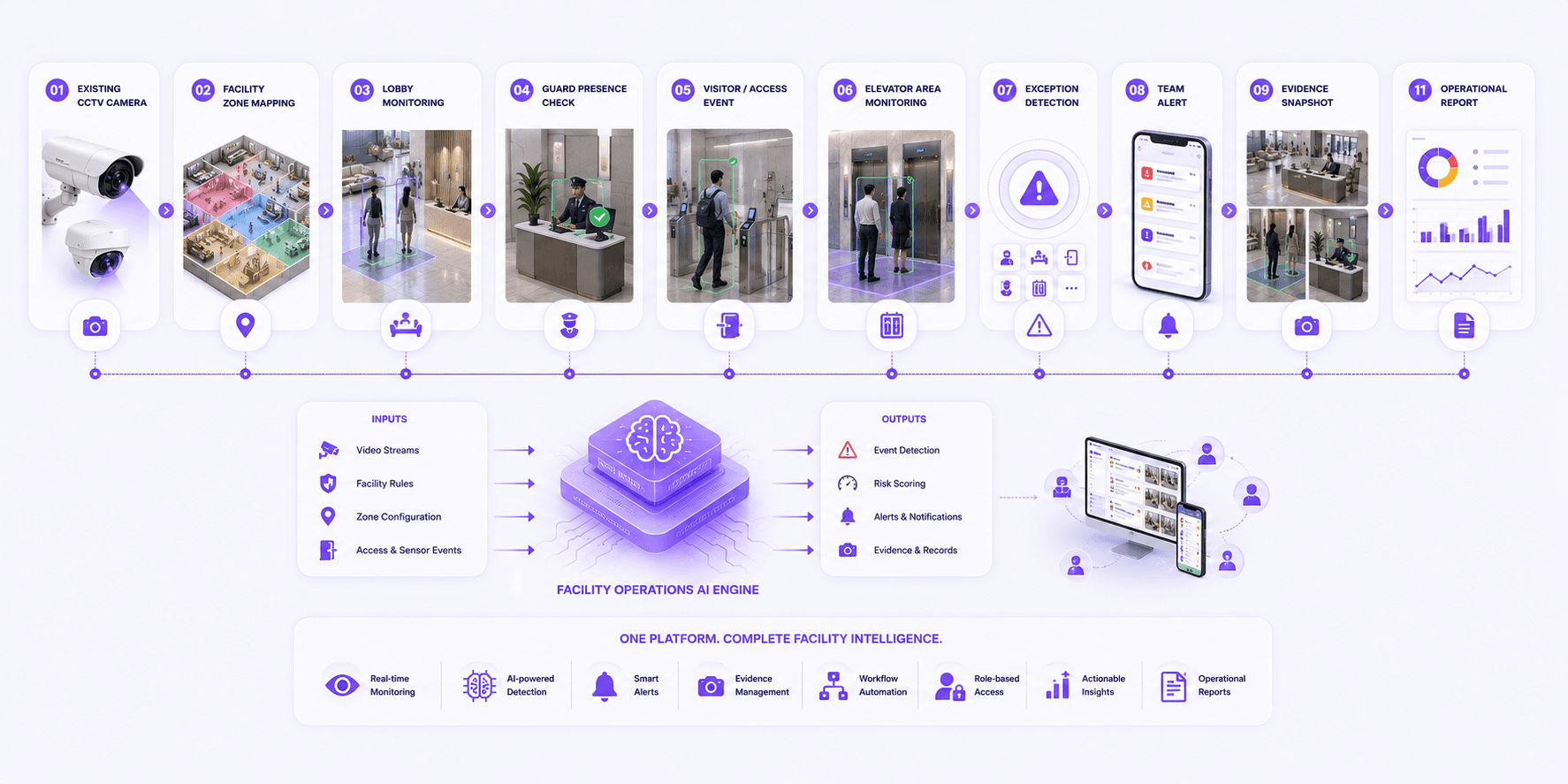
From camera view to facility operations record.
Omnivue turns building camera feeds into structured facility events, exception alerts, evidence snapshots and reports.
Camera views are mapped to facility zones and rules.
AI detects access, presence, crowd, elevator or facility exceptions.
Relevant teams receive alerts with location and camera context.
Evidence and review status are stored for audit and reporting.
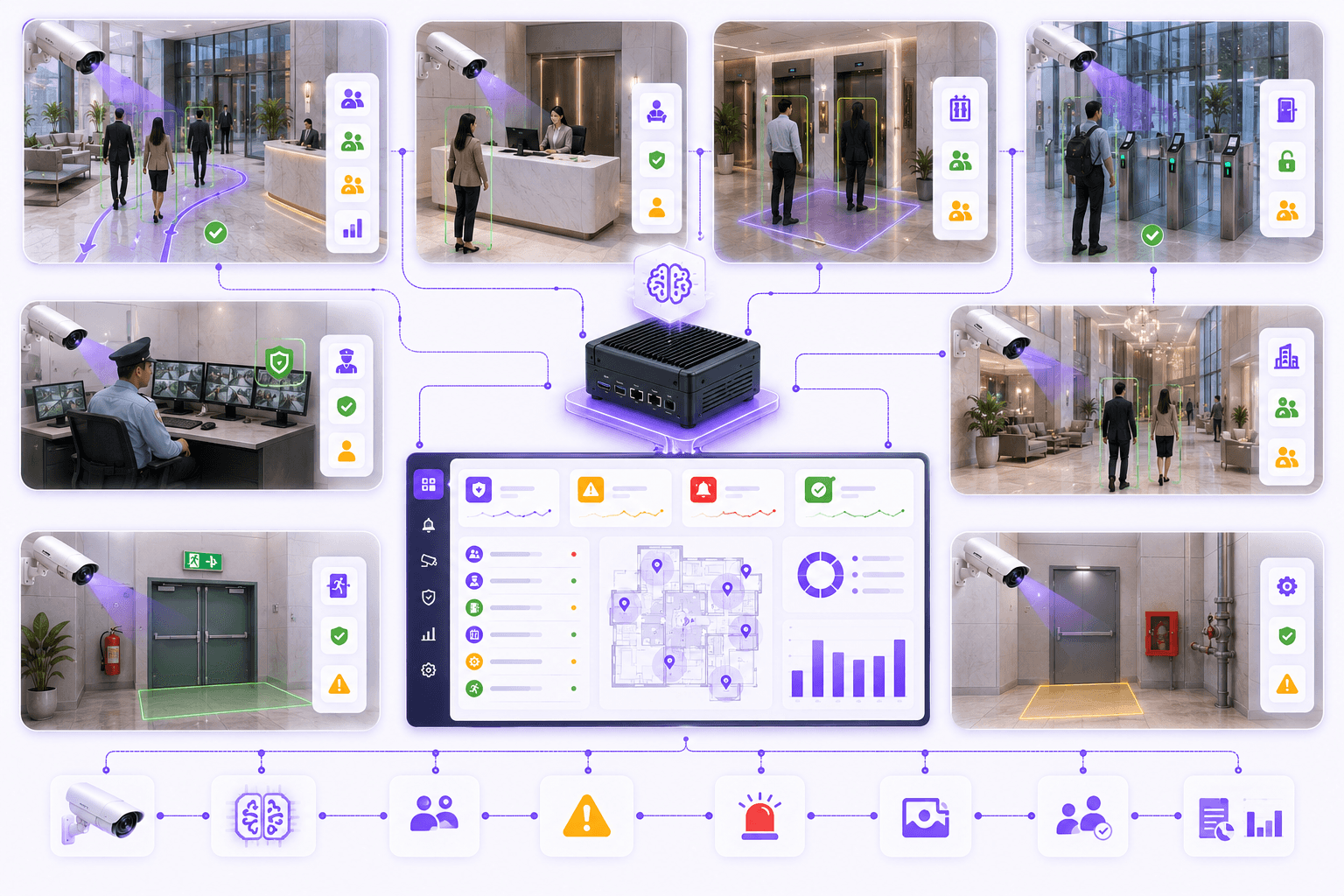
Deployment & configuration
Configure facility intelligence around your building layout.
Omnivue can support lobby operations, visitor flow, guard post monitoring, elevator-area visibility, access events and multi-building facility monitoring.
Lobby and reception monitoring
Guard desk presence checks
Elevator area visibility
Visitor movement and access events
Emergency and facility alert workflows
Multi-building monitoring
Evidence snapshots and reports
Offline / on-premise deployment
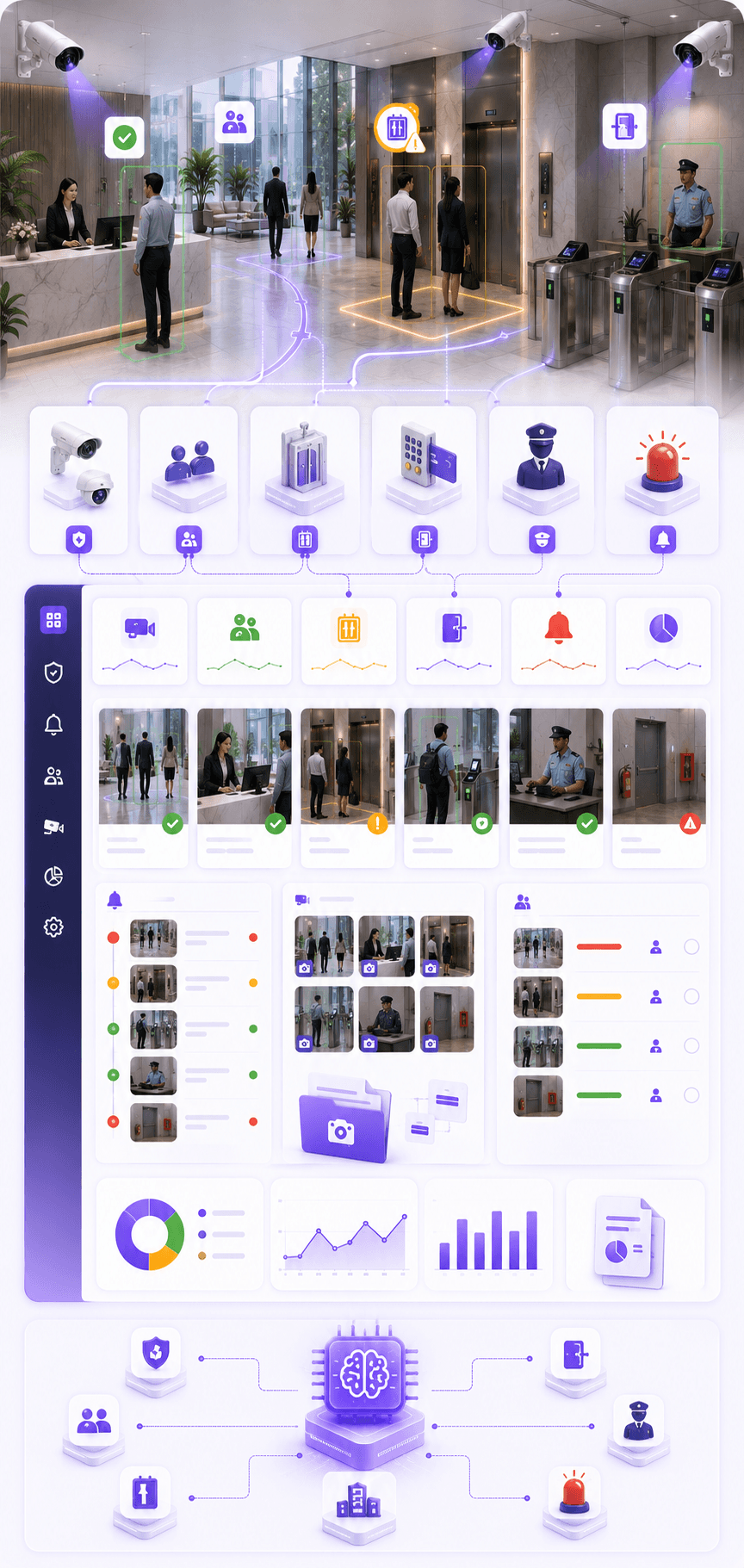
Powered by Omnivue Modules
Facility Operations AI connects multiple Omnivue modules into one building workflow.
Depending on the site, Facility Operations AI can combine access management, visitor workflows, elevator monitoring, guard presence, safety alerts and facility evidence into one operational layer.
Lobby and building-zone event monitoring
Guard presence and unattended post alerts
Visitor and access workflow visibility
Elevator area exception monitoring
Evidence snapshots and review history
Offline and on-premise deployment support
Better facility governance
Move from facility watching to facility intelligence.
Convert building zones into accountable workflows with alerts, evidence, review status and operational reports.
Traditional
Facility teams depend on manual CCTV watching
Omnivue
Cameras create structured facility events with location, time, evidence and review status.
Traditional
Guard absence or desk unattended events are noticed late
Omnivue
Configured zones can trigger alerts when a critical post is unattended.
Traditional
Elevator, lobby and access issues are handled separately
Omnivue
Operational signals from cameras, access points and facility zones are unified.
Traditional
Incident review requires manual video search
Omnivue
Evidence snapshots, camera context and event history make review faster.
Where it fits
Designed for buildings and facilities where operations need to be monitored, alerted and recorded.
Commercial Buildings
Lobby operations, access points, security desks, elevator areas and visitor movement.
Residential Communities
Gate operations, tower lobbies, guard desks, visitor flow and facility exceptions.
Corporate Campuses
Multi-building visibility, staff movement, visitor workflows and operational alerts.
Hospitals & Institutions
Reception areas, corridors, restricted zones and emergency-response visibility.
Outcomes
What improves after deployment?
Reduce dependence on manual CCTV watching
Improve visibility into facility exceptions
Create evidence-backed operational records
Connect reception, access, guard and building workflows
Improve response speed for incidents and unattended areas
Support offline and on-premise deployments where required
Best fit
Buildings with lobbies, gates, reception areas, elevators, guard desks, access points or facility zones that need evidence-backed operational visibility.
Fit & readiness
What makes facility operations AI work well?
Facility intelligence works best when zones, camera views, alert rules and response workflows are mapped before deployment.
Defined facility zones
Map lobbies, gates, desks, elevator areas, corridors and sensitive zones before deployment.
Usable camera coverage
Camera angles should clearly cover the operational areas that require monitoring.
Clear escalation rules
Define which events need alerts, who should receive them and what response is expected.
Workflow mapping
Visitor, guard, elevator, access and facility response workflows should be configured during setup.
Share your facility workflow. We’ll suggest the right setup.
Tell us your building layout, cameras, lobbies, gates, elevators, guard posts, visitor process and escalation needs. Omnivue can help design the right facility operations AI workflow.