
AI video workflows for resident access, visitor gates, parking and facility operations.
Use existing CCTV or IP cameras to manage resident access, visitor approvals, vehicle entry, parking zones, tower lobbies, elevator areas, guard posts and evidence-backed community operations.
Access
Residents & visitors
Vehicles
Gates and parking
Facilities
Lobbies and elevators
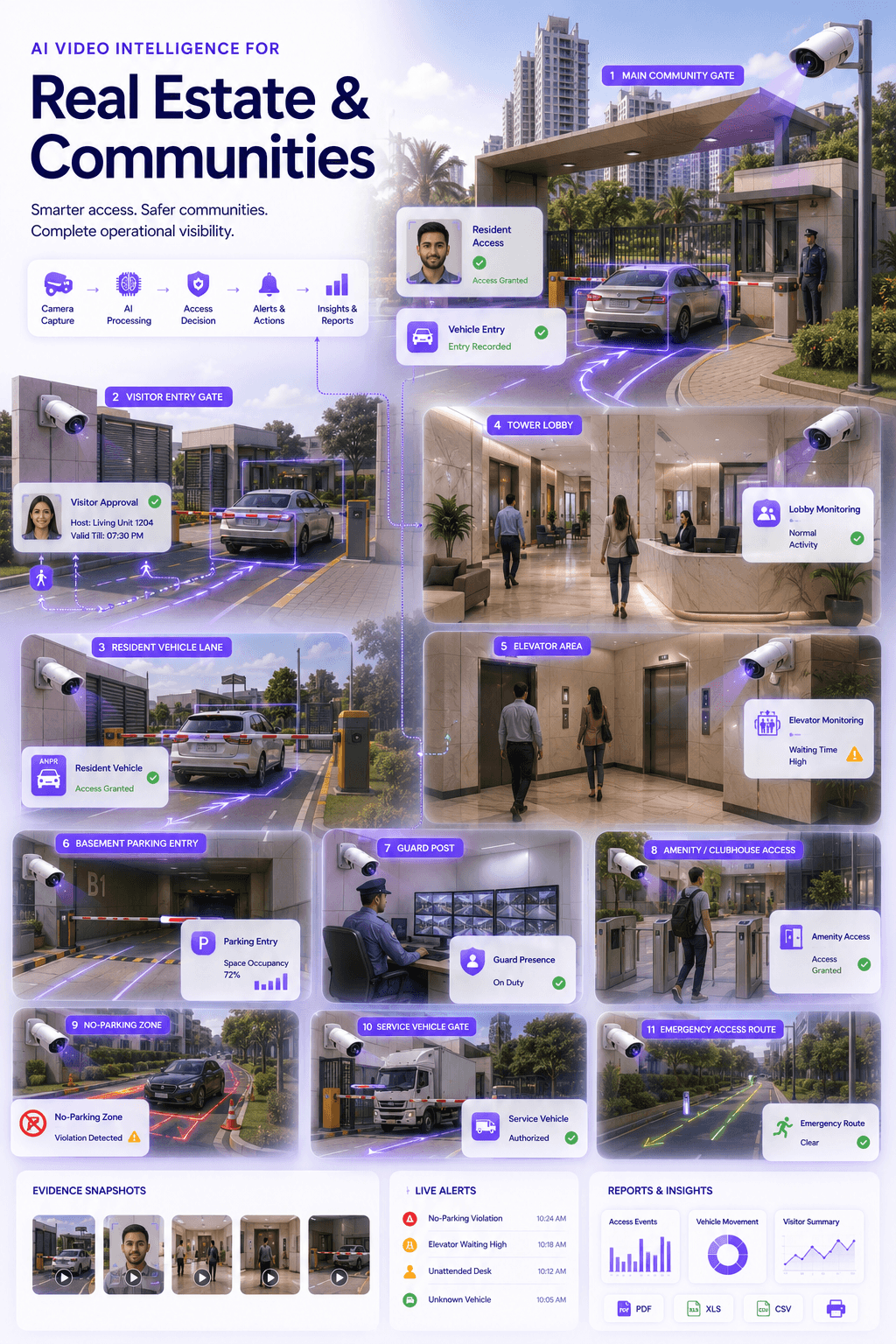
Resident
Access record
Visitor
Approval flow
Vehicle
Gate event
Facility
Evidence trail
Priority workflows
Communities need accountable access and facility visibility, not just camera footage.
Residential and commercial properties need clear records for residents, visitors, vehicles, staff, service workers, lobbies, parking areas and facility exceptions.
Core idea
Every community event should be linked to identity, vehicle, location, time, access decision and evidence snapshot.
Resident Access
Enable controlled resident entry using face, QR, vehicle identity or approval-based access workflows.
Visitor & Guest Entry
Record visitor arrival, host approval, time-bound access and entry-exit history at gates or reception.
Vehicle Gate & Parking
Use ANPR and vehicle intelligence for resident vehicles, visitor vehicles, staff parking and gate records.
Lobby & Guard Desk Monitoring
Monitor reception areas, tower lobbies, guard posts and unattended desk exceptions.
Elevator & Facility Safety
Improve visibility into lift areas, waiting zones, elevator incidents and building facility exceptions.
Evidence & Reports
Create searchable records for access events, visitor disputes, vehicle movement and facility incidents.
Operational gap
Communities already have cameras. The missing layer is access and facility intelligence.
CCTV footage is useful after an incident. Omnivue helps property teams turn selected camera views into access, visitor, parking, lobby, elevator and evidence workflows.
Resident and visitor access is fragmented
Cards, registers, WhatsApp approvals, security calls and vehicle lists often operate separately.
Gate teams need faster verification
Guards need better visibility into residents, visitors, staff, service workers and vehicles entering the community.
Facility incidents are noticed late
Elevator issues, unattended guard desks, lobby crowding and blocked access areas may not trigger timely response.
Incident review depends on manual CCTV search
Access disputes, visitor claims, vehicle events and facility complaints often require manual video review.
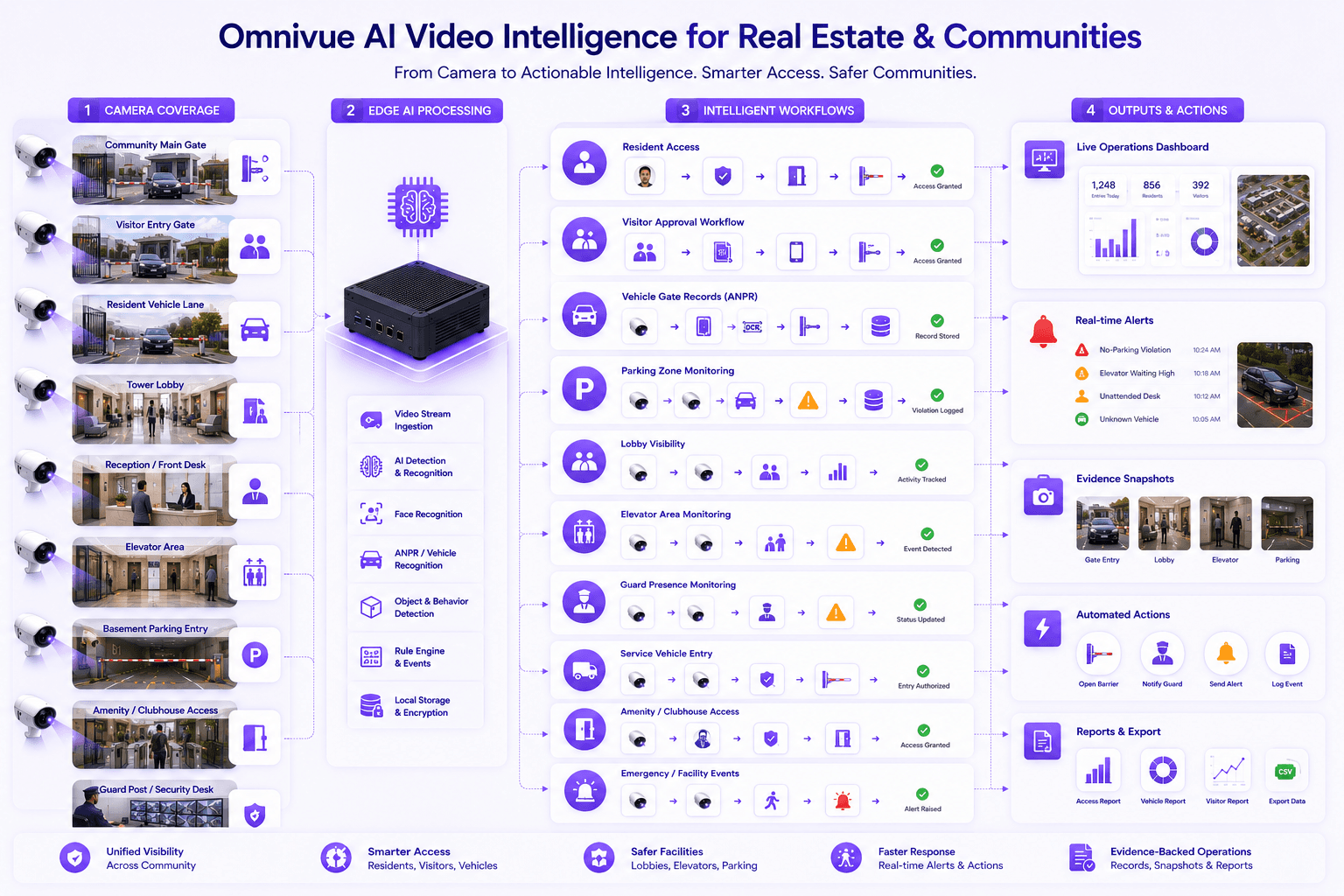
Recommended Omnivue stack
The industry page maps property workflows to the right modules.
Real estate and community deployments can combine access management, visitor workflows, ANPR, parking, elevator safety, guard desk monitoring and facility operations.
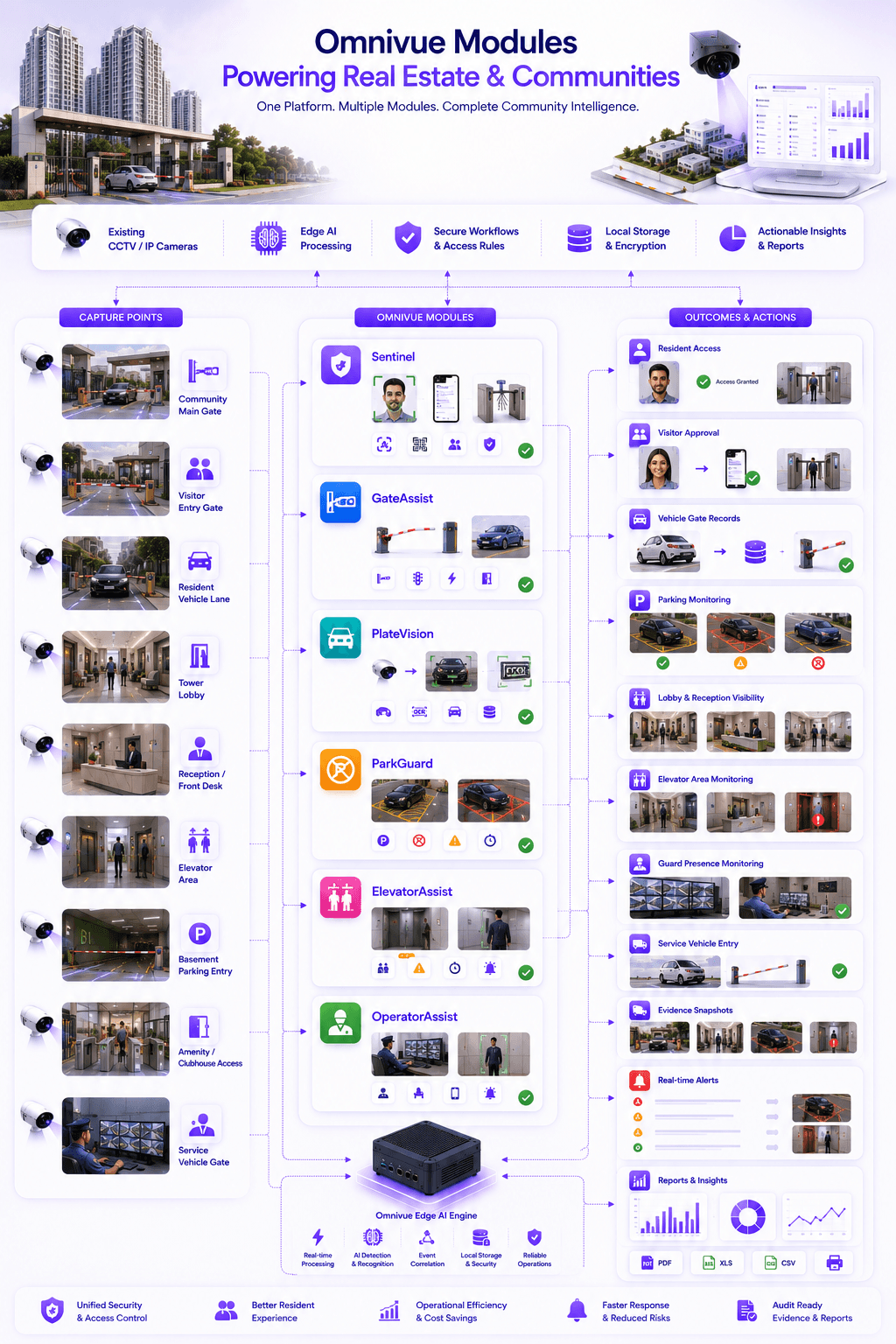
Sentinel
Resident, visitor, contractor and controlled access workflows
GateAssist
Vehicle gate access, barrier action and entry lane workflows
PlateVision
Vehicle identification, ANPR and entry-exit movement records
ParkGuard
Parking, waiting zones, no-parking and vehicle rule monitoring
ElevatorAssist
Elevator safety, lobby lift-area monitoring and incident visibility
OperatorAssist
Guard desk, staff post and operational compliance visibility
Deployment zones
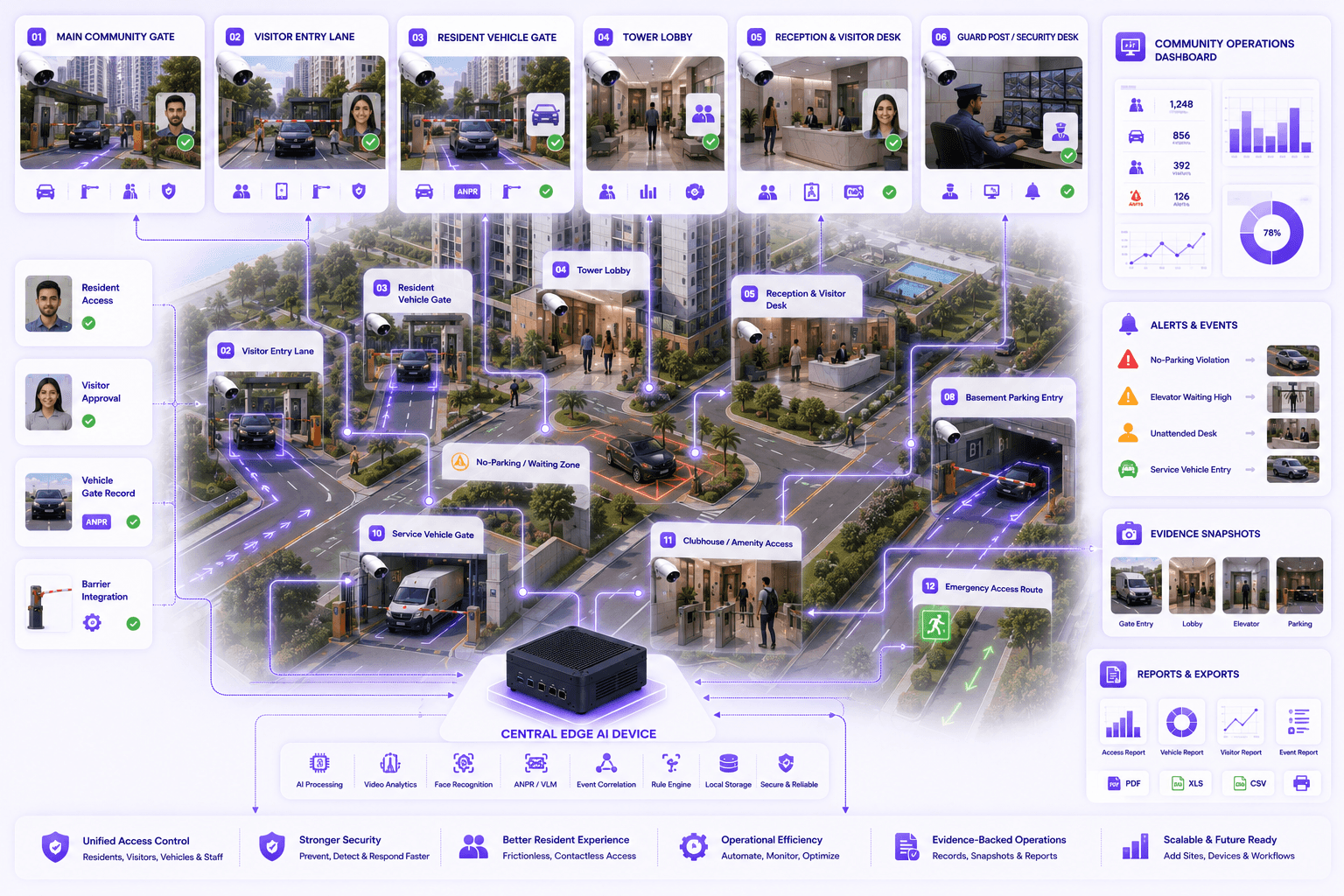
Map AI workflows around real community and building spaces.
Each zone can have different rules: resident access at tower lobbies, visitor approvals at gates, ANPR at vehicle lanes, parking monitoring in basements and safety alerts around elevator areas.
Main community gate
Visitor entry lane
Resident vehicle gate
Tower lobby
Reception and visitor desk
Guard post and security desk
Elevator waiting area
Basement parking entry
No-parking and waiting zones
Service vehicle gate
Clubhouse or amenity entry
Emergency access route
Outcomes
What improves after deployment?
Improve resident, visitor and vehicle access visibility
Reduce manual register and gate verification workload
Create evidence-backed access and facility records
Support barrier, turnstile and gate integrations
Improve response speed for lobby, lift and guard desk exceptions
Use existing CCTV or IP cameras where suitable
Fit & readiness
What should be planned first?
Gate and lobby workflow mapping
Identify resident gates, visitor gates, tower lobbies, reception desks, service entries and parking points.
Resident and visitor access rules
Define how residents, guests, service workers, staff, delivery vehicles and contractors should be verified.
Usable camera angles
Access, vehicle and lobby intelligence requires cameras placed where faces, vehicles and zones are visible.
Integration planning
Decide where Omnivue should integrate with barriers, turnstiles, visitor systems, resident apps or APIs.
Implementation approach
A practical deployment path for real estate and communities.
The goal is not to replace the entire surveillance system. The goal is to add an AI workflow layer over selected gate, lobby, parking, elevator and facility camera views.
Community assessment
Map gates, lobbies, cameras, parking entries, visitor flow, service gates and facility exception zones.
Workflow configuration
Configure resident access, visitor approval, vehicle entry, guard desk, parking and elevator-area rules.
Edge deployment
Run AI processing locally where required and connect selected events to dashboards, alerts and integrations.
Reporting and review
Generate access logs, visitor history, vehicle movement records, facility alerts and evidence snapshots.
Share your community workflow. We’ll map the right setup.
Tell us your gates, lobbies, cameras, resident access model, visitor process, parking areas, elevator issues and facility response needs. Omnivue can help design the right real estate and community AI workflow.