
AI video workflows for truck movement, loading bays, forklifts and yard exceptions.
Use existing CCTV or IP cameras to monitor truck entry and exit, loading bay activity, forklift movement, no-parking zones, obstruction, waiting areas and evidence-backed warehouse operations.
Movement
Truck & forklift records
Bays
Dock activity visibility
Evidence
Yard incident trails
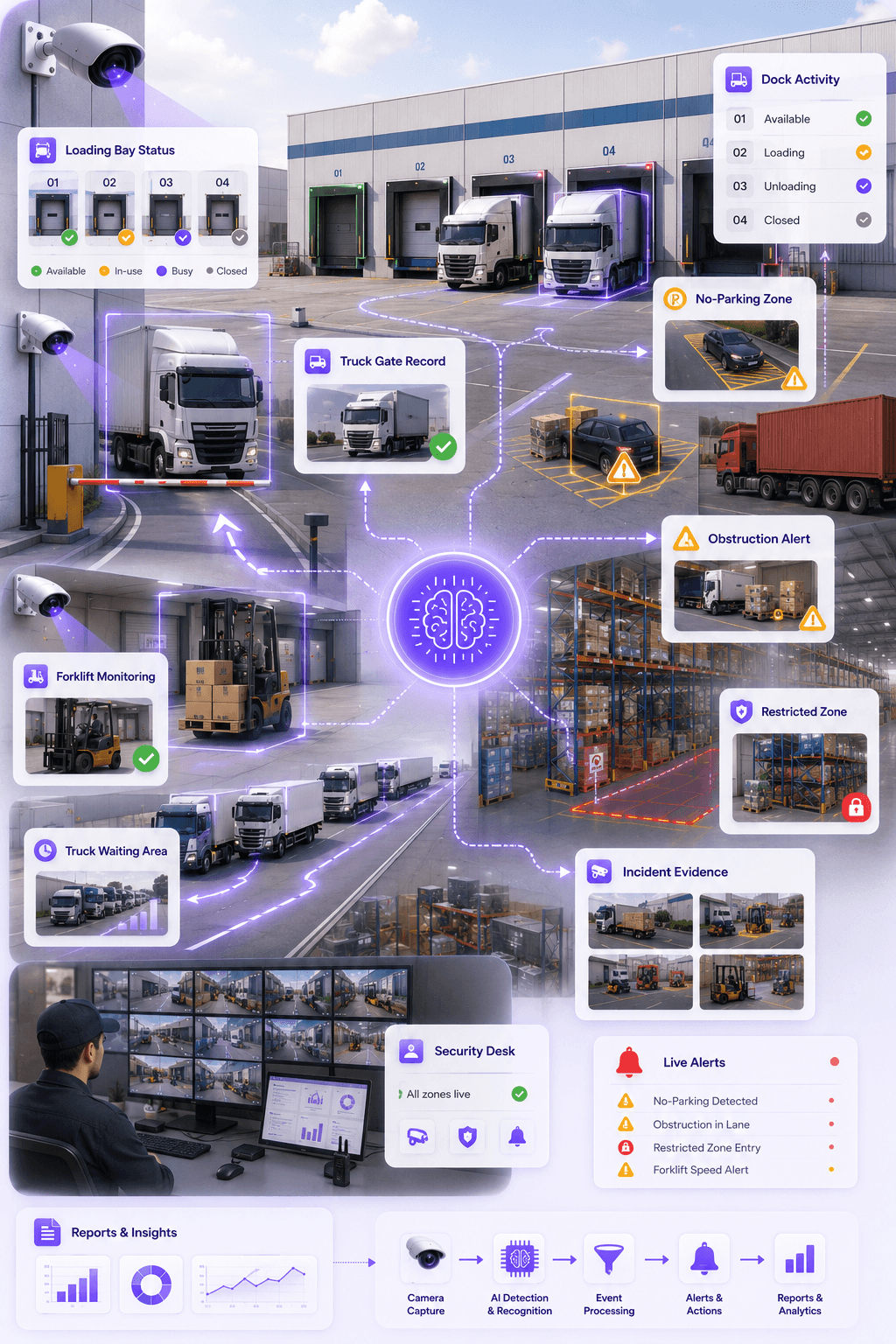
Gate
Truck record
Dock
Bay status
Forklift
Movement alert
Yard
Evidence trail
Priority workflows
Warehouse operations need structured movement visibility, not just camera footage.
Logistics sites need visibility across gates, docks, waiting zones, forklifts, parking lanes, restricted areas and incident points. Omnivue converts camera views into accountable yard workflows.
Core idea
Every important yard event should be linked to time, camera, zone, vehicle, event type and review status.
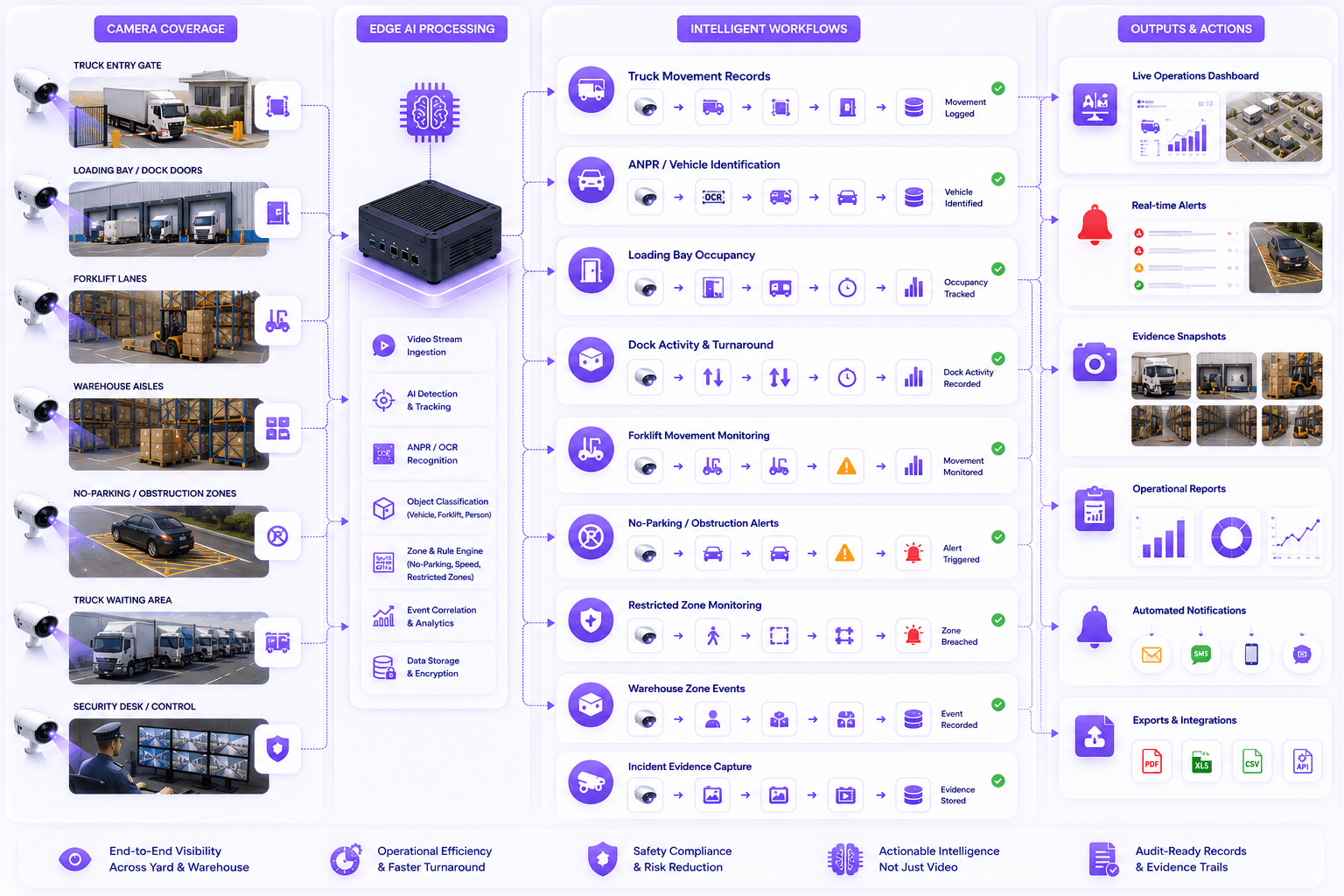
Truck Gate Movement
Track truck arrival, entry, exit and yard movement using camera-based vehicle events.
Loading Bay Activity
Monitor dock occupancy, loading status, waiting time and bay-level movement patterns.
No-Parking & Obstruction
Detect vehicles stopped in restricted zones, gate areas, fire lanes or loading paths.
Forklift Movement & Safety
Monitor forklift movement, speed zones, risky paths and interaction with people or vehicles.
Warehouse Zone Monitoring
Watch aisles, storage areas, dispatch zones, restricted areas and safety boundaries.
Evidence & Reports
Create searchable event records with camera, time, zone, vehicle, snapshot and review status.
Operational gap
Warehouses already have cameras. The missing layer is yard intelligence.
CCTV footage is useful after an incident. Omnivue helps warehouse and logistics teams turn selected camera views into truck, bay, forklift, obstruction and evidence workflows.
Yard visibility depends on manual updates
Operations teams often rely on guards, supervisors, phone calls or manual checking to know what is happening outside.
Truck waiting and bay delays are hard to prove
Arrival time, bay occupancy, waiting duration and loading delays are difficult to reconcile without structured records.
Obstruction and no-parking issues are noticed late
Vehicles blocking gates, dock paths, fire lanes or loading zones can create operational and safety problems.
Incident review depends on CCTV search
When a yard issue, damage claim or safety incident occurs, teams often need to manually scan video footage.
Recommended Omnivue stack
The industry page maps yard workflows to the right modules.
Warehouse and logistics deployments can combine vehicle intelligence, bay monitoring, no-parking alerts, forklift safety, speed monitoring and emergency access visibility.
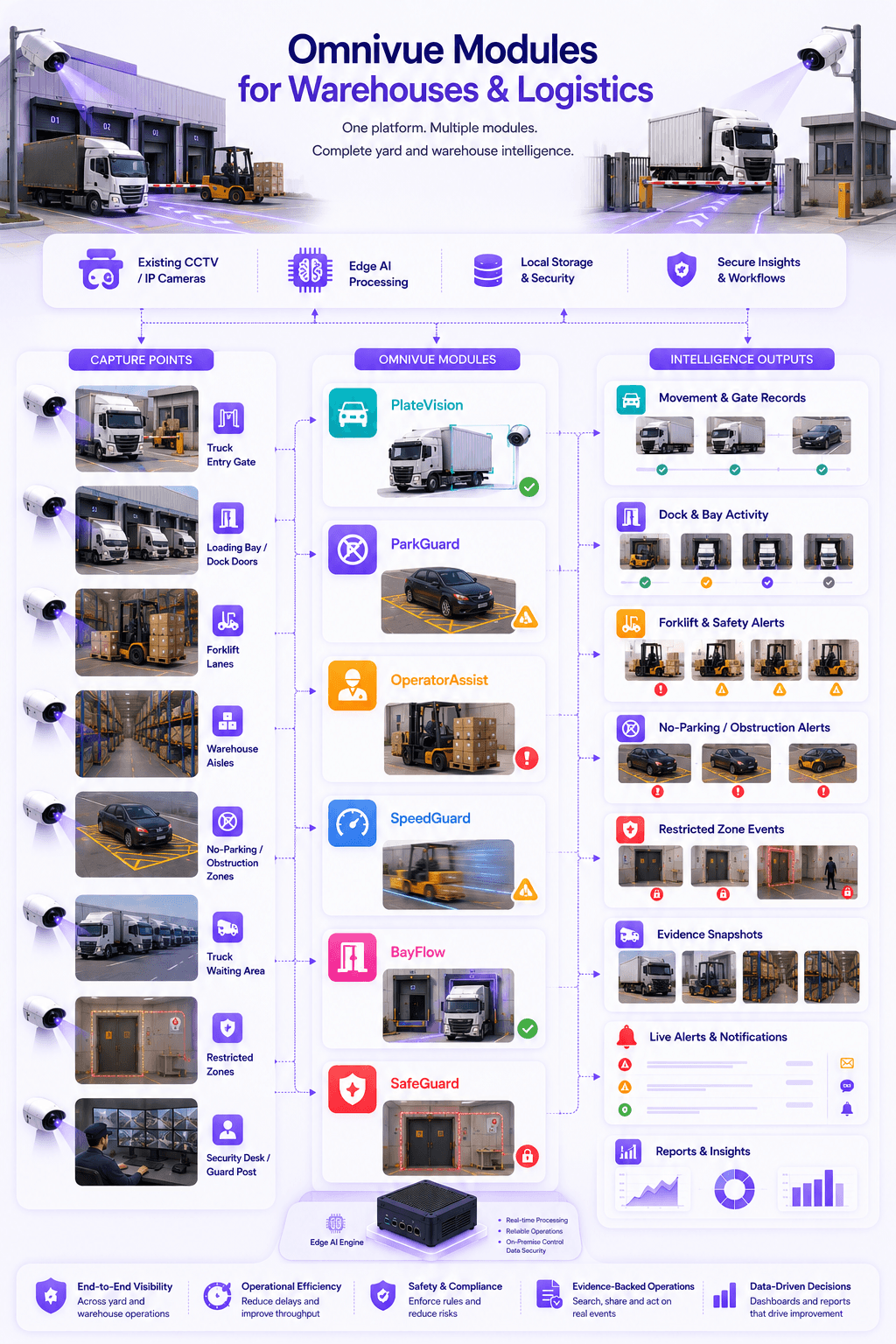
PlateVision
Truck, vehicle and ANPR-based gate movement records
ParkGuard
No-parking, obstruction, waiting zone and parking rule monitoring
OperatorAssist
Forklift safety, worker movement and operational compliance visibility
SpeedGuard
Forklift, vehicle and yard speed monitoring where required
BayFlow
Bay occupancy, service lane, loading and turnaround visibility
SafeGuard
Emergency access, restricted zones and safety exception alerts
Deployment zones
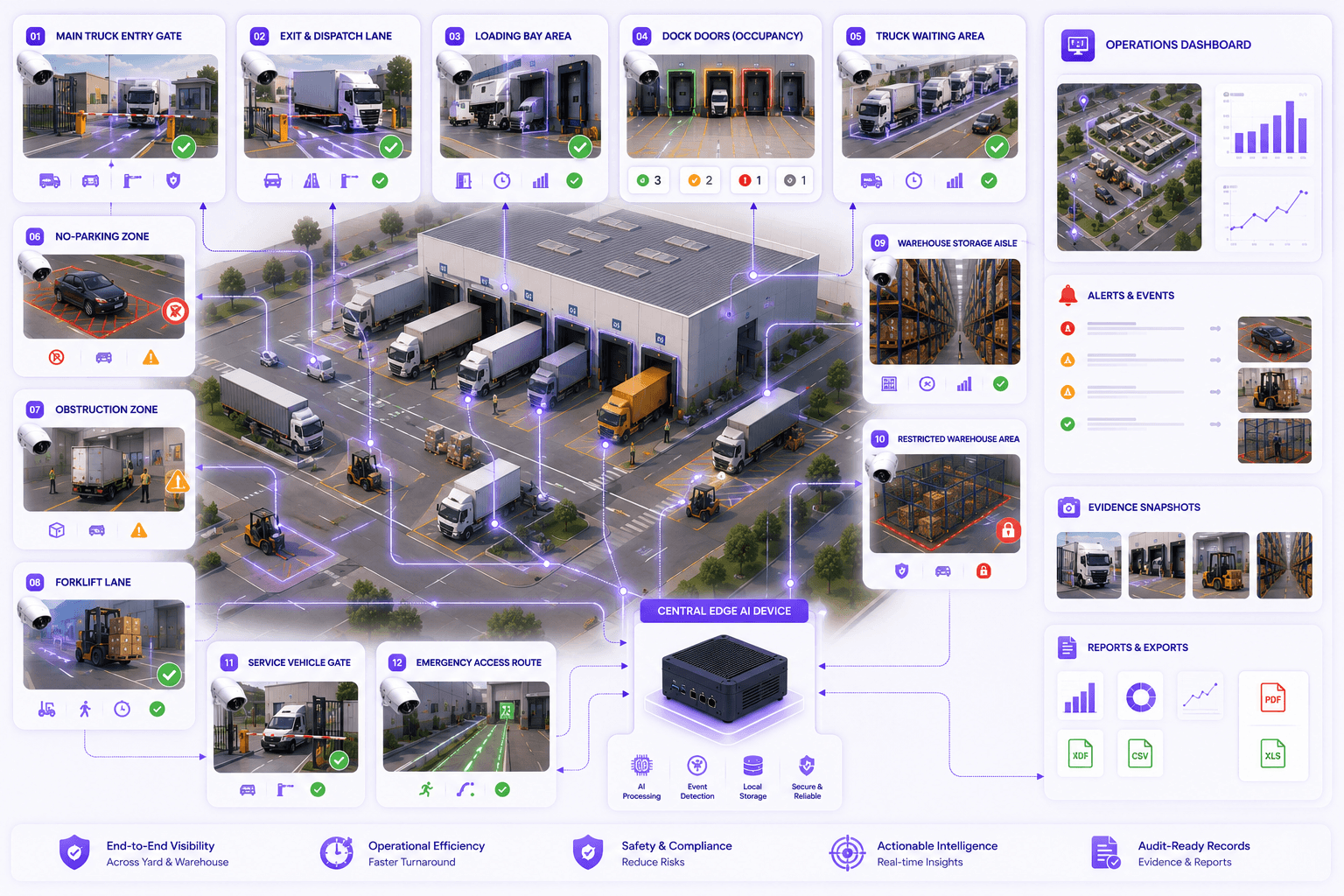
Map AI workflows around real warehouse and yard spaces.
Each zone can have different rules: ANPR at gates, bay activity at dock doors, obstruction in restricted areas, speed around forklift lanes and evidence capture for incidents.
Main truck entry gate
Exit gate and dispatch lane
Loading bay and dock doors
Truck waiting area
No-parking and obstruction zones
Forklift movement lanes
Warehouse storage aisles
Restricted warehouse zones
Yard parking area
Service vehicle gate
Emergency access route
Security desk and guard post
Outcomes
What improves after deployment?
Improve visibility into truck, dock and yard movement
Reduce manual yard coordination and follow-up
Detect obstruction, no-parking and restricted-zone events faster
Create evidence-backed records for yard incidents
Improve forklift and warehouse movement visibility
Support offline and on-premise deployments where required
Fit & readiness
What should be planned first?
Yard and bay mapping
Identify gates, dock doors, waiting zones, no-parking areas, forklift paths and restricted spaces before deployment.
Usable camera coverage
Camera angles should clearly cover truck lanes, dock activity, forklifts, parking zones and loading paths.
Operational rule definition
Waiting time, dwell time, no-parking, speed, obstruction and alert rules should be configured clearly.
Response ownership
Define who receives alerts, who reviews exceptions and which team acts on yard or warehouse events.
Implementation approach
A practical deployment path for warehouse and logistics sites.
The goal is not to replace the entire surveillance system. The goal is to add an AI workflow layer over selected yard, warehouse, dock and gate camera views.
Yard assessment
Map gates, docks, truck lanes, cameras, no-parking zones, forklift paths and warehouse areas.
Workflow configuration
Configure truck movement, loading bay, parking, obstruction, forklift and restricted-zone rules.
Edge deployment
Run AI processing locally where required and connect selected events to dashboards, alerts and reports.
Reporting and review
Generate movement logs, incident evidence, delay visibility, exception reports and audit trails.
Share your warehouse workflow. We’ll map the right setup.
Tell us your gates, cameras, docks, forklifts, parking zones, truck waiting areas, loading rules and escalation needs. Omnivue can help design the right warehouse and logistics AI workflow.